> For the complete documentation index, see [llms.txt](https://docs.photoroom.com/llms.txt). Markdown versions of documentation pages are available by appending `.md` to page URLs; this page is available as [Markdown](https://docs.photoroom.com/image-editing-api-plus-plan/ai-relight.md).
# AI Relight
## Overview
The Image Editing API allows you to correct lighting issues, such as over-exposition or under-exposition, by re-lighting the input image.
To re-light an image, set the argument `lighting.mode` to one of these three values:
* `ai.auto` for the lighting to be automatically adjusted
* `ai.preserve-hue-and-saturation` for the lighting to be adjusted while keeping color hues and saturations as close as possible to the original image
* this can be useful for product images, where maintaining color accuracy is important
* `ai.optimize-portrait` for the lighting to be optimized for human portrait photography. Specifically, this mode acts on the subject by:
* enhancing light intensity
* removing blemishes
* applying subtle teeth whitening
* preserving freckles and skin characteristics
{% hint style="warning" %}
Please note that AI Relight is currently limited to images with a maximum resolution of 3,500x3,500 pixels.
Known issue: we don't recommend using AI Relight along with [AI Expand](/image-editing-api-plus-plan/ai-expand.md) in a same API call.
{% endhint %}
## Examples
Here are some examples of what re-lighting can achieve by setting `lighting.mode=ai.auto`:
| *Original* | *Re-lighted* |
| :--------------------------------------------------------------------------------------------------------------------------------------------------------------------------------------------------------------------------: | :--------------------------------------------------------------------------------------------------------------------------------------------------------------------------------------------------------------------: |
|  |  |
|  |  |
|  |  |
If you want to give it a try, here's the code to reproduce the examples above:
{% code overflow="wrap" %}
```bash
curl --request POST \
--url https://image-api.photoroom.com/v2/edit \
--header 'x-api-key: YOUR_API_KEY' \
--form imageFile=@/path/to/your/image.jpg \
--form referenceBox=originalImage \
--form maxWidth=2000 \
--form maxHeight=2000 \
--form removeBackground=false \
--form lighting.mode=ai.auto \
--output with-re-lighting.png
```
{% endcode %}
Try it now!
And here are examples of the output produced by the different values for `lighting.mode`, for different use-cases:
### Second-hand marketplace
| *Original* | `lighting.mode=ai.auto` | `lighting.mode=ai.preserve-hue-and-saturation` |
| :----------------------------------------------------------------------------------------------------------------------------------------------------------------------------------------------------------------------------------: | :----------------------------------------------------------------------------------------------------------------------------------------------------------------------------------------------------------------------------------: | :----------------------------------------------------------------------------------------------------------------------------------------------------------------------------------------------------------------------------------: |
|  |  |  |
|  |  |  |
| .jpg?alt=media\&token=8cc24c3c-3b84-4625-8ea0-4fcf471d02b2) | .png?alt=media\&token=a108a7f7-45d6-4e19-8403-6e2cd9dae415) | .png?alt=media\&token=cc7f28ec-b265-4a8c-84f2-93dd8a59469c) |
|  |  |  |
|  |  |  |
### School portraits
| *Original* | `lighting.mode=ai.auto` | `lighting.mode=ai.preserve-hue-and-saturation` | `lighting.mode=ai.optimize-portrait` |
| :----------------------------------------------------------------------------------------------------------------------------------------------------------------------------------------------------------------------------------------------------------------------: | :----------------------------------------------------------------------------------------------------------------------------------------------------------------------------------------------------------------------------------------------------------------------: | :----------------------------------------------------------------------------------------------------------------------------------------------------------------------------------------------------------------------------------------------------------------------: | ------------------------------------------------------------------------------------------------------------------------------------------------------------------------------------------------------------------------------------------------------------------------ |
|  |  |  |  |
|  |  |  |  |
|  |  |  |  |
|  |  |  |  |
|  |  |  |  |
|  |  |  |  |
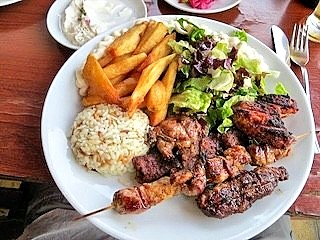
### Food industry
| *Original* | `lighting.mode=ai.auto` | `lighting.mode=ai.preserve-hue-and-saturation` |
| :-----------------------------------------------------------------------------------------------------------------------------------------------------------------------------------------------------------------------------------------------------------------: | :--------------------------------------------------------------------------------------------------------------------------------------------------------------------------------------------------------------------------------------------------------------------------------: | :------------------------------------------------------------------------------------------------------------------------------------------------------------------------------------------------------------------------------------------------------------------------------------------: |
| | |  |
| | | |
| | |  |
### Car industry
| *Original* | `lighting.mode=ai.auto` | `lighting.mode=ai.preserve-hue-and-saturation` |
| :-------------------------------------------------------------------------------------------------------------------------------------------------------------------------------------------------------------------------------------------------------------------------------: | :----------------------------------------------------------------------------------------------------------------------------------------------------------------------------------------------------------------------------------------------------------------------------------------------: | :-----------------------------------------------------------------------------------------------------------------------------------------------------------------------------------------------------------------------------------------------------------------------------------------------------------: |
| |  | |
| | |  |
| |  |  |
### Luxury industry
| *Original* | `lighting.mode=ai.auto` | `lighting.mode=ai.preserve-hue-and-saturation` |
| :---------------------------------------------------------------------------------------------------------------------------------------------------------------------------------------------------------------------------------------------------------------------: | :------------------------------------------------------------------------------------------------------------------------------------------------------------------------------------------------------------------------------------------------------------------------------: | :-------------------------------------------------------------------------------------------------------------------------------------------------------------------------------------------------------------------------------------------------------------------------------------------: |
| |  |  |
| | | |
| |  |  |
---
# Agent Instructions
This documentation is published with GitBook. GitBook is the documentation platform designed so that both humans and AI agents can read, navigate, and reason over technical content effectively. Learn more at gitbook.com.
## Querying This Documentation
If you need additional information that is not directly available in this page, you can query the documentation dynamically by asking a question.
Perform an HTTP GET request on the following URL with the `ask` and `goal` query parameters:
```
GET https://docs.photoroom.com/image-editing-api-plus-plan/ai-relight.md?ask=&goal=
```
`ask` is the immediate question: it should be specific, self-contained, and written in natural language.
`goal` is what the user is ultimately trying to achieve, the reason they need the answer. Sharing it helps GitBook give you a better, more relevant answer. A goal is most helpful when it describes the outcome the user wants rather than restating the question. For example, with `ask=how do I create an API token`, a goal like `build a script that syncs our docs to a CMS` lets GitBook tailor the answer to that use case.
The response will contain a direct answer to the question and relevant excerpts and sources from the documentation.
Use this mechanism when the answer is not explicitly present in the current page, you need clarification or additional context, or you want to retrieve related documentation sections.
 |
|  |  |
|
|  |
|  |
|  |
|  |
|
|
|  |
|  |  |
### Car industry
| *Original* | `lighting.mode=ai.auto` | `lighting.mode=ai.preserve-hue-and-saturation` |
| :-------------------------------------------------------------------------------------------------------------------------------------------------------------------------------------------------------------------------------------------------------------------------------: | :----------------------------------------------------------------------------------------------------------------------------------------------------------------------------------------------------------------------------------------------------------------------------------------------: | :-----------------------------------------------------------------------------------------------------------------------------------------------------------------------------------------------------------------------------------------------------------------------------------------------------------: |
|
|  |
### Car industry
| *Original* | `lighting.mode=ai.auto` | `lighting.mode=ai.preserve-hue-and-saturation` |
| :-------------------------------------------------------------------------------------------------------------------------------------------------------------------------------------------------------------------------------------------------------------------------------: | :----------------------------------------------------------------------------------------------------------------------------------------------------------------------------------------------------------------------------------------------------------------------------------------------: | :-----------------------------------------------------------------------------------------------------------------------------------------------------------------------------------------------------------------------------------------------------------------------------------------------------------: |
|  |  |
|  |  |
|
|
|  |
|  |  |
|
|  |
|  |  |  |
### Luxury industry
| *Original* | `lighting.mode=ai.auto` | `lighting.mode=ai.preserve-hue-and-saturation` |
| :---------------------------------------------------------------------------------------------------------------------------------------------------------------------------------------------------------------------------------------------------------------------: | :------------------------------------------------------------------------------------------------------------------------------------------------------------------------------------------------------------------------------------------------------------------------------: | :-------------------------------------------------------------------------------------------------------------------------------------------------------------------------------------------------------------------------------------------------------------------------------------------: |
|
|  |  |
### Luxury industry
| *Original* | `lighting.mode=ai.auto` | `lighting.mode=ai.preserve-hue-and-saturation` |
| :---------------------------------------------------------------------------------------------------------------------------------------------------------------------------------------------------------------------------------------------------------------------: | :------------------------------------------------------------------------------------------------------------------------------------------------------------------------------------------------------------------------------------------------------------------------------: | :-------------------------------------------------------------------------------------------------------------------------------------------------------------------------------------------------------------------------------------------------------------------------------------------: |
|  |  |  |
|
|  |  |
|  |
|  |
|  |
|
|
|  |  |  |
---
# Agent Instructions
This documentation is published with GitBook. GitBook is the documentation platform designed so that both humans and AI agents can read, navigate, and reason over technical content effectively. Learn more at gitbook.com.
## Querying This Documentation
If you need additional information that is not directly available in this page, you can query the documentation dynamically by asking a question.
Perform an HTTP GET request on the following URL with the `ask` and `goal` query parameters:
```
GET https://docs.photoroom.com/image-editing-api-plus-plan/ai-relight.md?ask=
|  |  |
---
# Agent Instructions
This documentation is published with GitBook. GitBook is the documentation platform designed so that both humans and AI agents can read, navigate, and reason over technical content effectively. Learn more at gitbook.com.
## Querying This Documentation
If you need additional information that is not directly available in this page, you can query the documentation dynamically by asking a question.
Perform an HTTP GET request on the following URL with the `ask` and `goal` query parameters:
```
GET https://docs.photoroom.com/image-editing-api-plus-plan/ai-relight.md?ask=